

It’s easy to walk past the AED cabinet every day and assume everything is fine. But what if it isn’t? A silent, blinking red light or an expired set of electrode pads can render the device useless in an emergency. These are the exact issues a routine check is designed to catch. A monthly inspection is your proactive strategy for finding and fixing small problems before they become critical failures. It transforms your AED program from a reactive one to one that is always prepared. This guide provides a comprehensive ZOLL AED monthly inspection checklist and explains what to do if you find an issue, ensuring you can keep your device online and ready.
Key Takeaways
- Prioritize the visual status indicator and expiration dates: These two checks are the fastest way to confirm your AED is ready. A green checkmark and valid dates for pads and batteries mean you’re prepared, while a red ‘X’ or expired supplies signal an immediate problem.
- A failed inspection requires immediate action: If an AED shows a warning sign, remove it from service right away to prevent it from being used in an emergency. Then, follow a clear process for troubleshooting, repair, or replacement to close the gap in your safety coverage.
- Document every check to create an audit-ready record: Consistent documentation is your proof of compliance and due diligence. A complete log protects your organization from liability and ensures you have a clear maintenance history for every device.
Why Inspect Your ZOLL AED Monthly?
An automated external defibrillator (AED) is one of those things you hope you never have to use. Because it often sits quietly in its cabinet, it’s easy to adopt an “out of sight, out of mind” mentality. But that’s precisely why a consistent inspection routine is so important. A few minutes each month is all it takes to verify your device is ready to perform its life-saving function.
Think of it as a non-negotiable part of your organization’s safety plan. Regular checks ensure your ZOLL AED is ready for an emergency, meets compliance standards, and functions exactly as it should.
Stay Ready for an Emergency
An AED can save a life during a sudden cardiac arrest, but only if it’s in proper working order. In a high-stress emergency, the last thing you want to discover is a dead battery or a device error. Monthly inspections are your first line of defense against this worst-case scenario. By visually checking the device, you confirm that it’s ready to go at a moment’s notice. This simple, proactive step is fundamental to effective emergency preparedness and gives you confidence that your equipment is ready when seconds matter most.
Meet Compliance Requirements
Beyond readiness, regular inspections are often a legal requirement. Many states have laws mandating specific maintenance and documentation protocols for AEDs. Keeping a detailed log of your monthly checks is a best practice that demonstrates your commitment to safety and helps you meet industry standards and OSHA guidance. This documentation creates an audit-ready record that protects your organization from liability and confirms you are following through on your duty of care. It’s not just about checking a box; it’s about maintaining a culture of safety and accountability.
Prevent Device Failures
ZOLL AEDs are designed to perform regular self-tests, but a monthly hands-on inspection is still essential for catching issues the device can’t report on its own. During your check, you might spot physical damage to the casing, find that supplies in the rescue kit have been used, or notice the device has been moved. More importantly, you’ll confirm the status indicator shows a green checkmark, signaling that the last self-test was successful. Catching a warning indicator, a low battery, or expired electrode pads early allows you to address the problem long before the device is ever needed.
The Complete ZOLL AED Monthly Inspection Checklist
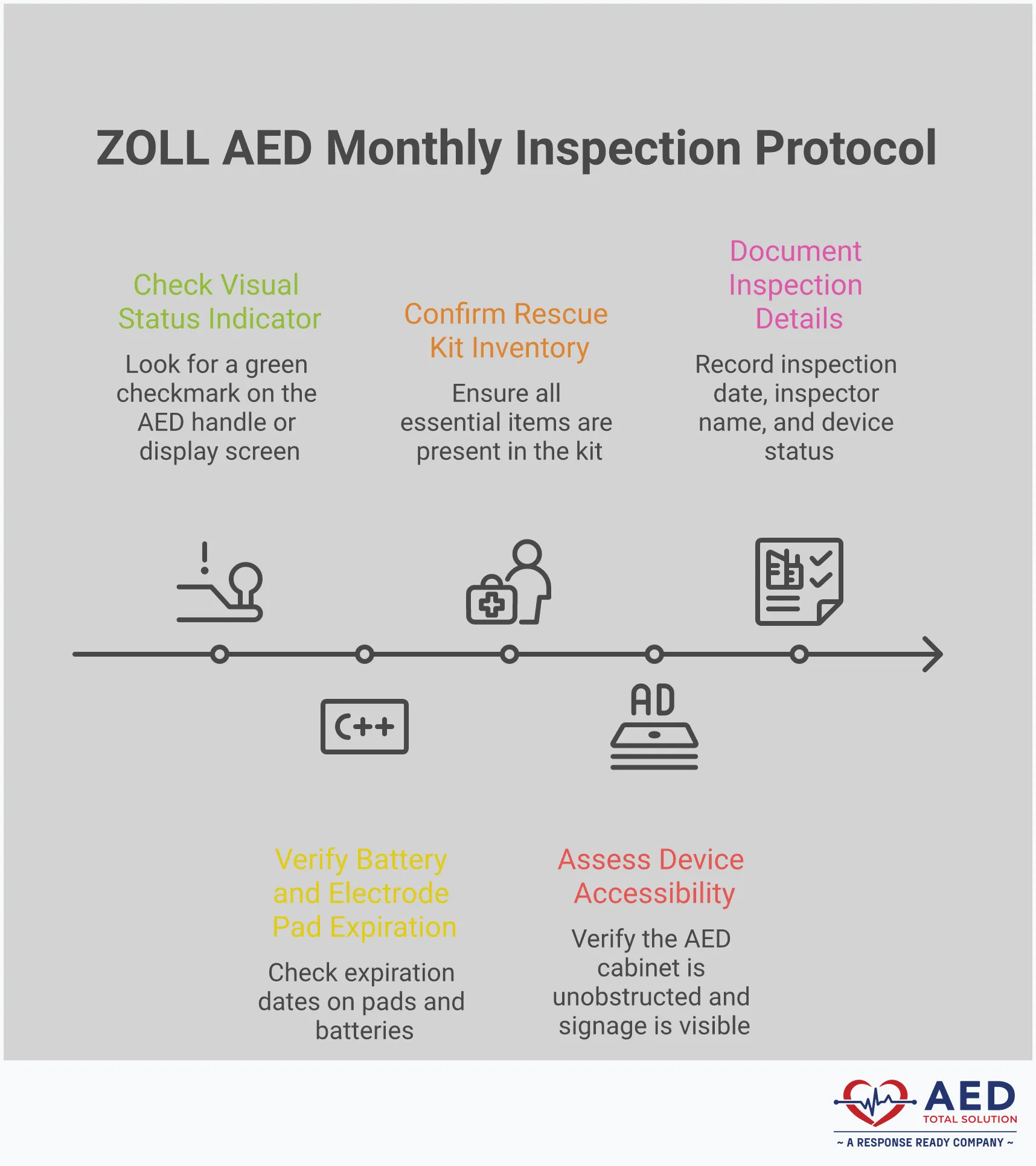
A monthly inspection is the best way to confirm your ZOLL AED is ready for an emergency. While these devices are designed for reliability, regular checks for physical damage, expiring accessories, and readiness issues are essential for compliance and peace of mind. This simple checklist breaks down the five key areas to review every month to ensure your device is prepared to save a life. Following these steps consistently will help you stay ahead of maintenance needs and keep your program audit-ready.
Check the Visual Status Indicator
The first thing you should look for is the visual status indicator on your ZOLL AED. This small but critical feature is your window into the device’s health. A clear, green checkmark (✔️) on the handle or screen means the AED has passed its last self-test and is ready for use. If you see a red ‘X’ or no indicator at all, the unit needs immediate attention. This symbol signals a problem, such as a low battery or an internal issue detected during a self-test. Don’t ignore it. A red ‘X’ means the device may not function in an emergency, so it’s a clear sign to take it out of service and troubleshoot the problem right away.
Verify Battery and Pad Expiration Dates
Your AED’s pads and batteries have a limited shelf life, and using expired components can lead to device failure. During your monthly check, locate the expiration dates printed on the electrode pad packaging and the battery. ZOLL pads typically last between two to five years, while batteries have an install-by or expiration date that is usually around five years. Make a note of these dates in your inspection log. If any components are within a few months of expiring, it’s time to order replacements. Proactive AED supply management ensures you always have functional accessories on hand and your device remains ready for a rescue.
Assess the AED’s Physical Condition
Next, give the AED a quick but thorough physical inspection. Look over the entire outer casing for any signs of damage, like cracks, deep scratches, or loose parts. A damaged casing could mean the internal components are compromised. Check that the device is clean and free of dust or grime that could interfere with its operation or obscure the visual indicator. Also, make sure all sockets and connections are clear of debris. The AED should be stored in a clean, dry location, but a quick wipe-down during your inspection helps maintain its condition and ensures it’s ready to be grabbed and used without issue.
Take Inventory of the Rescue Kit
An AED rescue kit contains essential tools for preparing a person for defibrillation, and it’s just as important as the device itself. Open your rescue kit and confirm that all items are present and in good condition. A standard kit should include trauma scissors for cutting away clothing, a razor for shaving a hairy chest, disposable gloves for rescuer protection, and a barrier mask for performing CPR. Some kits may also include wipes for drying the chest. If any items are missing or have been used, restock them immediately. These simple tools save precious seconds during an emergency, ensuring the electrode pads can make solid contact with the skin.
Review AED Accessibility and Placement
A life-saving device is only effective if people can find and reach it quickly. As part of your monthly check, confirm the AED is stored in a visible and unobstructed location. It should be easily accessible, ideally in a main hallway, reception area, or near other high-traffic spots. Make sure nothing has been placed in front of the AED cabinet, like boxes, furniture, or equipment, that could block access. Verify that any accompanying signage is still clearly visible and points directly to the device’s location. This final check ensures that when an emergency happens, responders won’t waste critical time searching for the AED.
How to Perform a ZOLL AED Self-Test
One of the best features of modern AEDs is that they do most of the heavy lifting for you. ZOLL AEDs are designed to monitor their own health through regular, automated self-tests. Your job during a monthly inspection isn’t to run a complicated diagnostic, but simply to check the results of these tests. Think of it as checking the engine light on your car—the device tells you if it needs attention. Understanding how to read these simple cues is the key to ensuring your AED is always ready to go.
How the Self-Test Works
You don’t need to manually trigger a ZOLL AED’s self-test; it happens automatically. On a set schedule, AEDs perform self-tests to check their internal parts, battery, and pads. This internal checkup verifies that the software is running correctly, the electrical components are functional, and the battery has enough power for a rescue. It also confirms that the electrode pads are properly connected and haven’t expired. This automated process is the first line of defense against device failure, giving you a clear and constant picture of your AED’s readiness status without any hands-on work.
How to Read the Results
After a self-test, the ZOLL AED displays its status on a simple visual indicator. This is the most important part of your monthly check. You should always check this indicator. If the AED shows a warning (like a red light or sound), it means it’s not ready. A warning signal is your cue that the device needs immediate attention and should be serviced. This at-a-glance system is designed for busy people, allowing anyone to quickly confirm if the AED is operational or if it requires troubleshooting. This is a core part of any effective AED program management plan.
What the Green Checkmark vs. Red X Means
On the ZOLL AED Plus, the status indicator is very straightforward. Look for a green check mark. This means the device passed its last self-check and the batteries and pads are working. It’s your green light, confirming the AED is ready for an emergency. If you see a red X, the device has a problem, such as expired pads, a low battery, or an internal error. A red X means you must take it out of service right away. Don’t just make a note to fix it later—remove the unit from its location to ensure no one tries to use a faulty device during a crisis.
What to Do If Your ZOLL AED Fails Inspection
Discovering that your ZOLL AED has failed its inspection can be stressful, but it’s a situation you can manage effectively with a clear plan. A failed self-test, indicated by a red “X” or an audible warning, means the device has detected an issue and is not ready for a rescue. This is precisely why regular inspections are so important—they allow you to find and fix problems before an emergency happens. Instead of panicking, think of it as an opportunity to ensure your equipment is in perfect working order. The following steps will guide you through exactly what to do to get your AED back online and keep your program compliant.
Take Immediate Action
If your ZOLL AED’s status indicator shows a red “X” or you hear a warning chirp, the device needs your attention right away. This signal means the AED is not ready for use and requires servicing. Don’t ignore or postpone dealing with it. The first step is to acknowledge the warning and consult the device’s user manual for initial troubleshooting steps. Regular checks are the foundation of a reliable emergency response program, and taking swift action when a problem arises is just as critical. Following the manufacturer’s guidance is the best way to maintain an AED and ensure it’s always prepared for an emergency.
Remove the Device from Service
Once you’ve identified that the AED is not functioning correctly, you must immediately remove it from its accessible location. Leaving a non-functional device in place creates a serious risk; someone might grab it in an emergency, only to find it doesn’t work. A red “X” can indicate several issues, from expired pads and a depleted battery to a more complex internal error. By taking the device out of service, you prevent a potential failure during a rescue attempt. Place a sign indicating the unit is out of order and being serviced, and communicate the status to your response team so everyone is aware.
Contact Technical Support
After removing the device from its cabinet, your next call should be to the manufacturer or your service provider. If you see a red “X” or can’t resolve the issue with basic troubleshooting, it’s time to contact technical support. The support team can walk you through diagnostic steps to identify the specific problem and will advise you on the best course of action. They can help determine if you need to order new accessories, like batteries or pads, or if the device needs to be sent in for professional repair. Don’t try to guess or perform complex repairs yourself—let the experts guide you to ensure the device is restored to perfect working condition.
Arrange for a Temporary Replacement
An out-of-service AED creates a gap in your safety coverage. While your primary device is being repaired, it’s essential to have a functional AED available. Arranging for a temporary replacement ensures you remain prepared for a sudden cardiac arrest emergency. Many organizations find that an AED rental is a fast and effective solution to bridge this gap. A rental unit can be deployed quickly, keeping your program compliant and your people protected. Also, if your AED was recently used in a rescue, remember to replace the used electrode pads and check the other supplies in your rescue kit.
How to Document Your Monthly Inspections
An inspection isn’t complete until you’ve documented it. Keeping a clear, consistent record of your monthly checks is just as important as performing them. This documentation is your proof of compliance and readiness, protecting your organization and ensuring you have a complete history for every device. Think of it as the official logbook for your AED program—it shows you’ve done your due diligence and helps you spot trends or recurring issues over time. Without it, you’re leaving compliance to chance.
What Your Documentation Needs
Every inspection log should capture the essential details in a clear and organized way. Maintaining a detailed record of all AED inspections and maintenance is a critical best practice that helps ensure your device is always ready for an emergency. For each check, make sure you record the date, the inspector’s name or initials, and the AED’s serial number or unique identifier. Your log should also note the status of the visual indicator (pass/fail), the expiration dates for both the battery and electrode pads, and a confirmation that all rescue kit supplies are present. If you take any corrective actions, like replacing pads or contacting support, be sure to log those, too.
How to Maintain an Inspection Log
Consistency is key to a useful inspection log. Your process should be straightforward enough for anyone on your team to follow. Best practices for AED maintenance include regular checks of the status indicator, a visual scan for physical damage, and verifying that batteries and pads are within their use-by dates. Each of these points should have a corresponding entry in your log every month. Whether you use a paper tag attached to the AED cabinet or a digital file, make sure it’s updated immediately after every inspection. This creates an unbroken chain of accountability and makes it easy to see the device’s entire service history at a glance.
Digital vs. Paper Records
While a paper log attached to the AED cabinet might seem simple, it comes with risks—it can get lost, damaged, or become illegible. For organizations with multiple devices, paper records quickly become an administrative headache. This is where digital solutions shine. AED management software provides digital checklists and automated reminders, which significantly improves compliance and simplifies maintenance tracking. A digital system centralizes all your records, gives you an at-a-glance view of your entire program, and creates a secure, permanent audit trail that paper just can’t match. It’s the most reliable way to manage your documentation, especially as your program grows.
Create Audit-Ready Reports
Your inspection logs are the backbone of your compliance strategy. In the event of an audit or an incident review, you’ll need to provide clear, complete documentation to demonstrate that your AED program meets all requirements. Having audit-ready reports means you can quickly and confidently prove that every device has been properly maintained and is ready for use. Digital management systems excel at this, often allowing you to generate comprehensive reports with just a few clicks. This not only saves valuable time but also gives you peace of mind that your program is always protected, documented, and prepared for scrutiny.
Common Inspection Mistakes (And How to Fix Them)
Even with a solid checklist, mistakes can happen. Monthly inspections are simple in theory, but in practice, things like staff turnover, competing priorities, and inconsistent processes can create gaps in your AED program’s readiness. The good news is that these common hurdles are easy to clear once you know what to look for. Forgetting to log an inspection or not having a clear person in charge can leave your organization exposed, but a few simple adjustments can make all the difference.
Focusing on consistent documentation, clear staff accountability, and knowing when to ask for help will protect your program from these frequent missteps. Let’s walk through how to fix them so you can be confident your ZOLL AED is always ready for an emergency.
Avoid Gaps in Your Documentation
One of the most prominent issues in AED maintenance is inconsistent or incomplete record-keeping. A paper logbook tucked away in a cabinet is easily forgotten, leading to missed entries and a documentation trail full of holes. Maintaining a detailed log of every inspection isn’t just a good idea—it’s a critical part of meeting compliance requirements and proving your device is ready. If an emergency occurs, you’ll need a clear record showing the AED was properly maintained.
The fix is to establish a reliable system. Digital checklists and management software provide a clear, time-stamped record of every check. This approach removes the guesswork and ensures every step is documented correctly, creating an audit-ready report at a moment’s notice.
Solve Staff Accountability Issues
When an inspection is missed, it’s often because no one was sure whose job it was. Vague responsibility is a recipe for failure. If everyone thinks someone else is handling it, chances are nobody is. Similarly, if the designated person isn’t properly trained on what to look for, the inspection might as well not have happened. An untrained eye can easily miss a flashing red X or an expired set of pads.
To fix this, assign the responsibility for monthly inspections to a specific person or a small, dedicated team. Then, make sure they receive proper training. Creating a simple schedule for training and refreshers helps your team stay prepared to manage these devices effectively. Clear roles and consistent education are the keys to maintaining high standards of readiness and compliance.
How Professional Program Management Can Help
Let’s be honest—managing an AED program can feel like a full-time job, especially if you have multiple devices or locations. Juggling expiration dates, tracking inspections, and keeping up with changing regulations is a lot to handle. This is where many organizations find themselves overwhelmed and at risk of non-compliance. When your primary focus is running a business or school, it’s easy for AED oversight to fall through the cracks.
Instead of managing it all yourself, you can work with a partner that specializes in AED program management. A full-service solution handles every detail for you, from monitoring device readiness and tracking consumables to ensuring all documentation is perfect. This approach simplifies compliance, reduces liability, and gives you complete confidence that your program is always protected and ready.
Related Articles
- AED Inspection and Maintenance: A Complete Guide — AED Total Solution
- AED Inspection Software: Top 5 Benefits for Safety & Compliance | AED Total Solution
- AED Cost Explained – Your Questions Answered
Frequently Asked Questions
How long should a monthly AED inspection take? A thorough monthly inspection should only take a few minutes. Your goal is to be efficient and consistent. You’re primarily checking the status indicator for a green checkmark, glancing at the expiration dates on the pads and battery, making sure the rescue kit is stocked, and confirming the unit is clean and accessible. Once you have a routine, you can complete the entire check in less than five minutes.
If the ZOLL AED runs its own self-tests, why do I need to do a manual check? The automated self-test is fantastic for checking the AED’s internal components, software, and battery levels. However, it can’t tell you if the cabinet is blocked by a stack of boxes, if the rescue kit has been used and not restocked, or if the device’s casing has a crack from being bumped. Your hands-on check covers these external factors that are just as critical for ensuring the AED is truly ready for a rescue.
Who is the best person in an organization to handle these inspections? You don’t need a medical professional to perform the monthly check. The ideal person is someone who is detail-oriented and reliable. This is often a facilities manager, a safety coordinator, an office administrator, or a designated member of your emergency response team. The most important thing is to assign the responsibility to a specific person or role to ensure it gets done consistently every month.
What should I do if I find an issue, like expired pads, during an inspection? If you discover an issue that doesn’t cause the device to fail its self-test, like pads that are expiring next month, you should take proactive steps. Order replacement supplies right away so you can swap them out before they officially expire. Be sure to record your findings and the actions you took in your inspection log. This creates a clear record that you are actively managing your AED program.
Is a paper log kept in the AED cabinet good enough for documentation? While a paper log is better than nothing, it can easily get lost, damaged, or become illegible over time. For true peace of mind and audit-ready records, a digital system is far more reliable. Digital logs create a secure, time-stamped history of every inspection and can send you reminders so a check is never missed. This is especially helpful for organizations managing multiple devices across different locations.