
You already know your AED battery has an expiration date. But its actual lifespan is influenced by much more than just the date printed on the label. The environment where you store the device, how often it runs its automated self-tests, and even the ambient temperature can shorten its life significantly. Simply setting a calendar reminder for the AED battery expiration date isn’t always enough to guarantee readiness. A truly prepared program accounts for all the real-world factors that affect battery performance. This article will explore those hidden variables, helping you ensure your device has the power it needs when it matters most.
Key Takeaways
- Focus on the Expiration Date: While a battery may have several dates, the expiration date is the most important one. Treat it as a strict deadline for replacement to ensure your AED is always ready to function during an emergency.
- Make Monthly Visual Checks a Habit: An expiration date assumes ideal conditions. Regularly inspect your AED’s status indicator, battery, and pads to catch early warning signs or issues caused by environmental factors like heat and cold.
- Create a System to Eliminate Guesswork: Don’t rely on memory to track critical dates. Implement a reliable system—whether it’s a simple inspection log, automated software, or a professional management service—to ensure nothing ever falls through the cracks.
What Do the Dates on Your AED Battery Mean?
When you’re responsible for an AED, the dates printed on the battery are some of the most important details to track. Ignoring them can lead to device failure during a sudden cardiac arrest emergency, which is a risk no one can afford. But with terms like “manufactured,” “install-by,” and “expiration,” it’s easy to get confused. What do they all mean, and which ones require action?
Understanding these dates is the first step toward a reliable and compliant AED program. A battery is the heart of your life-saving device, and its viability is non-negotiable. Let’s clear up the confusion so you can feel confident that your AED is ready to perform when seconds count. We’ll break down the three key dates you might see and explain why each one is critical for keeping your device in a constant state of readiness.
Manufactured vs. Install-By vs. Expiration: What’s the Difference?
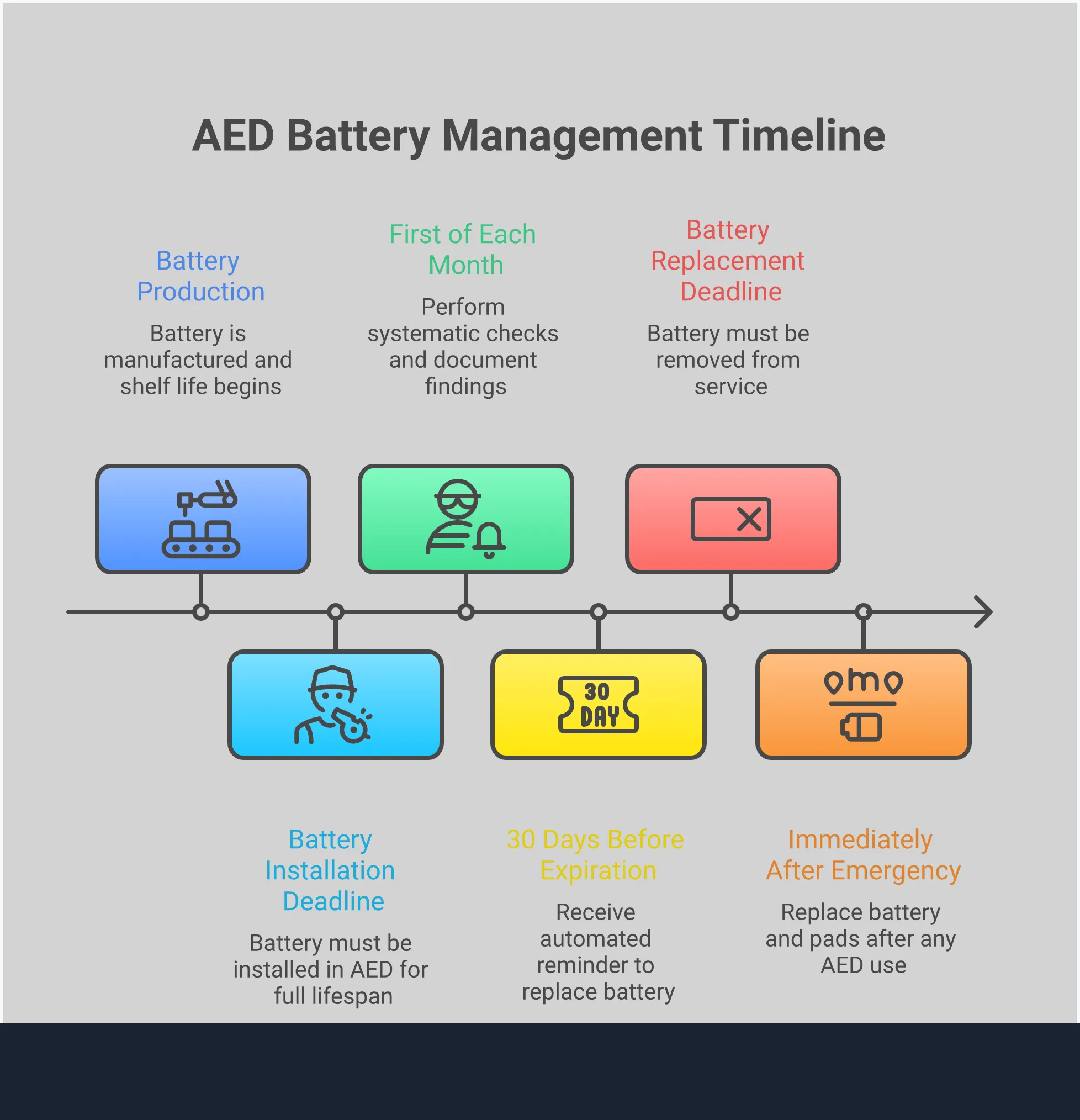
Think of the dates on your AED battery as a set of instructions. The Manufactured Date is simply the day the battery was produced. The Install-By Date is the manufacturer’s deadline for you to place the battery into service in your AED to get its full lifespan. Finally, the Expiration Date is the final day the battery is certified to work. After this date, the battery can no longer be trusted to power your AED effectively during a rescue. Not all batteries have all three dates, so it’s important to identify which ones are on your specific model.
Why Every Date Matters for Rescue-Readiness
Each date provides a crucial piece of information for your maintenance schedule. An expired battery is one of the most common reasons for AED failure. Tracking these dates ensures your device has the power it needs to deliver a shock. It’s not just about readiness; it’s also about compliance. Using an expired battery can put your organization at risk and undermine your entire emergency response plan. Proactive AED program management means replacing components before they expire, keeping your program audit-ready and your people protected. This simple step is fundamental to ensuring your AED is always prepared for an emergency.
Clearing Up Common Myths About Battery Life
A common mistake is assuming an AED battery will last forever if the device is never used. In reality, every battery has a limited standby life—typically two to five years—and it loses power over time, even when idle. For batteries with an “Install-By” date, the clock on its lifespan starts ticking the moment you install it. For example, a battery with a five-year standby life must be replaced five years after installation. Don’t treat the expiration date as a suggestion; it’s a strict deadline. When it’s time for a new one, you can find the right replacement AED batteries to keep your device rescue-ready.
How to Find Your AED Battery’s Expiration Date
Knowing your AED battery’s expiration date is one of the most important parts of keeping your device ready for an emergency. A dead battery means the AED is useless, which can have devastating consequences. The good news is that finding and understanding these dates is straightforward once you know what to look for. Most AED batteries last between two and five years, but you should never guess.
Regularly checking the date is a non-negotiable part of your maintenance routine. While many AEDs have a low-battery warning, you don’t want to wait for that alert. Proactive checks ensure your device is always prepared. Let’s walk through exactly where to find the date on your battery, how to read the label correctly, and what the different types of dates actually mean for your device’s readiness.
Find the Date on Any AED Model
The first step is to physically locate the battery on your AED. On most devices, you can access it by flipping the AED over or opening a compartment on the back. Once you remove the battery cartridge, look for a printed label directly on it. The exact location and format will vary slightly across different AED models, but the expiration date is almost always clearly displayed.
Don’t just rely on the AED’s status indicator light. While a green blinking light usually means the device is ready, a physical inspection of the battery and pads is the only way to be certain you’re ahead of expiration dates. Make this visual check a core part of your monthly inspection routine to catch upcoming expirations with plenty of time to order a replacement.
Read Battery Labels and Markings with Confidence
Once you’ve found the label, you need to know what you’re looking for. Manufacturers make it pretty clear. You’ll often see the date printed next to an hourglass symbol (⌛) or the letters “EXP.” This is the final date the battery should be in service. It’s important to remember that both batteries and electrode pads expire, and both must be replaced to keep your device compliant and functional.
Reading these labels shouldn’t feel intimidating. Think of it as checking the expiration date on a carton of milk—it’s a simple but critical step to ensure safety. Getting comfortable with this process gives you confidence that your device is truly ready to save a life. If tracking these dates feels like a burden, professional AED program management can handle all inspections and replacements for you.
Decode Different Date Formats and Codes
To make things a little more complex, you might see a few different dates on your battery. It’s crucial to know which one matters most. AED batteries can have three different types of dates: a manufactured date, an install-by date, and an expiration date.
- Manufactured Date: This is the date the battery was produced. It’s a starting point for the battery’s overall shelf life but isn’t the expiration date.
- Install-By Date: This is the deadline for placing the battery into the AED to ensure you get its full-rated service life. If you install it after this date, it may not last as long as promised.
- Expiration Date: This is the most critical date. The battery must be removed from service and properly disposed of on or before this date, regardless of when it was installed. If your battery has a clear expiration date, that is the only one you need to follow.
What Factors Shorten an AED Battery’s Lifespan?
Think of the expiration date on your AED battery as a “best by” date, not a guarantee. While manufacturers provide a reliable estimate for how long a battery should last under ideal conditions, several real-world factors can drain its power much faster. The environment where you store your AED, how often it runs self-tests, and whether it’s ever been used in a rescue all play a significant role in its actual lifespan.
Understanding these variables is crucial for keeping your device rescue-ready. A battery that fails unexpectedly can turn a life-saving device into a useless box during an emergency. That’s why proactive monitoring is so important. Instead of just setting a calendar reminder for the expiration date, you need a clear picture of the day-to-day conditions affecting your AED. Managing these details is a core part of a successful AED program, ensuring your device has the power it needs when every second counts.
How Temperature and Environment Affect Your Battery
Just like your phone battery drains faster on a hot day, your AED battery is sensitive to its surroundings. Storing an AED in a place with extreme temperatures—either too hot or too cold—is one of the quickest ways to shorten its life. For example, leaving an AED in a vehicle, a non-climate-controlled warehouse, or an outdoor cabinet exposed to direct sunlight can cause the battery to degrade prematurely. The ideal storage environment is a consistent, room-temperature location, which helps preserve the battery’s chemical integrity and ensures it holds a charge for as long as possible.
The Impact of Self-Tests and Device Use
Your AED isn’t just sitting idle; it’s designed to perform regular, automated self-tests to confirm it’s functioning correctly. While these checks are essential for readiness, they consume a small amount of energy each time. Over several years, the cumulative effect of these tests will gradually deplete the battery. Of course, the biggest power drain comes from actual use during a sudden cardiac arrest event. If an AED is deployed in a rescue, the battery and pads must be replaced immediately, regardless of the expiration date. Frequent use will naturally require more frequent battery changes.
Proper Storage to Maximize Battery Life
Most AED batteries are designed to last between two and seven years in “standby mode”—meaning the device is stored properly and waiting to be used. It’s important to remember that this countdown begins the day you install the battery, not the date it was manufactured. To get the most out of your battery’s standby life, store your AED according to the manufacturer’s guidelines. This typically means keeping it in a climate-controlled, easily accessible location where it’s protected from moisture, dust, and physical damage. Proper storage is the foundation for maximizing battery life and ensuring your device is ready to perform when needed.
What to Do When Your AED Battery Expires
An expired AED battery is a liability waiting to happen. It renders your device useless in an emergency, defeating the entire purpose of having one. But knowing what to do when that date approaches can feel a little overwhelming, especially when you’re managing multiple devices. The good news is that replacing a battery is straightforward, and staying ahead of expiration dates is simple with the right process.
The moment you notice a battery is expired or failing, it’s time to take the AED out of service until a replacement is installed. This prevents a false sense of security and ensures no one grabs a non-functional device during a crisis. Forgetting is human, which is why many organizations rely on an AED program management partner to track these critical dates and handle replacements automatically. But if you’re managing your program yourself, here’s a clear guide to spotting a failing battery, replacing it correctly, and disposing of the old one responsibly.
Spot the Warning Signs of a Failing Battery
Your AED is designed to tell you when its battery is getting low, so you don’t have to rely solely on the expiration date. Most devices have a visual status indicator—often a green light or checkmark—that shows it’s ready. If that indicator turns red, flashes, or disappears, it’s a clear sign something is wrong. Many AEDs will also emit a loud, repetitive chirping sound to get your attention. Think of it like a smoke detector with a low battery. It’s an unmistakable alert that you should never ignore. As soon as you see or hear these warnings, it’s time to investigate and likely replace the battery.
Your Step-by-Step Replacement Guide
Once you have a new battery, the replacement process is simple. First, take the AED out of service and turn it off. Open the battery compartment—usually on the back of the device—and remove the old battery. Insert the new one, making sure it clicks securely into place. This is also the perfect time to check the expiration date on your electrode pads, as they often have a similar lifespan and may need to be replaced, too. After closing the compartment, turn the AED back on. It will run a self-test, and the status indicator should turn green, confirming it’s rescue-ready. You can find replacement batteries and pads for all major models online.
How to Safely Dispose of and Recycle Old Batteries
You can’t just toss an old AED battery in the trash. Most are made with lithium and are considered hazardous waste, requiring special disposal to protect the environment. Think of them like laptop or cell phone batteries. The best way to handle them is to take them to a certified e-waste or electronics recycling center in your community. Many office supply or home improvement stores also have battery drop-off bins. Participating in proper AED recycling ensures these materials are handled safely and don’t end up in a landfill. It’s a small but important step in managing your AED program responsibly from start to finish.
How to Stay on Top of AED Battery Expiration Dates
Keeping track of expiration dates is one of the most critical parts of owning an AED, but it’s also one of the easiest to overlook. When you’re managing multiple devices across different locations, the risk of a battery expiring unnoticed grows. A dead battery turns a life-saving device into a useless box. The good news is that staying on top of these dates doesn’t have to be a source of stress. You can build a reliable system by creating a manual inspection routine, using automated reminders, or handing the entire process over to a dedicated management service. Let’s walk through how each approach can help you ensure your AEDs are always ready for an emergency.
Create a Simple Monthly Inspection Routine
The most straightforward way to manage your AEDs is to build a hands-on inspection routine. Think of it as a quick monthly health check for your device. Set a recurring reminder on your calendar for the first of every month to perform a visual check. During your inspection, look at the AED’s status indicator to make sure it’s showing a green checkmark or “OK” symbol. Then, confirm the expiration dates printed on the battery and the electrode pads. Documenting these checks on a simple log sheet creates a record of readiness and helps you anticipate when you’ll need to order replacement supplies. This simple, consistent habit is a fundamental step in responsible AED ownership.
Use Automated Systems to Track Dates for You
If manual tracking feels like one too many things on your to-do list, an automated system can be a game-changer. AED compliance management software is designed to do the remembering for you. These programs log the expiration dates for all your batteries and pads and send you automatic email or text reminders well before they’re due for replacement. This simple switch from a manual log to a digital system helps eliminate human error and ensures a critical deadline never slips through the cracks. It’s an effective way to streamline your process, especially as you add more devices, giving you confidence that your AED program is always up to date.
Let the Experts Handle It: The Value of Professional Management
For complete peace of mind, you can delegate the entire lifecycle of your AEDs to a professional management service. This is the most comprehensive approach, moving beyond simple reminders to active, hands-on oversight. A full-service provider doesn’t just tell you when a battery is about to expire—they manage the entire replacement process for you, from ordering the correct parts to ensuring they’re installed. They also handle proper disposal and recycling of old batteries, closing the loop on compliance. This white-glove service removes the administrative burden from your team and significantly reduces liability, ensuring your program is not just monitored, but truly managed by experts in AED readiness.
Related Articles
- AED Battery Replacement Guide – Steps for a Safe Change
- AED Program Management | Compliance and Maintenance
- AED Cost Explained – Your Questions Answered
Frequently Asked Questions
My AED battery has three different dates on it. Which one do I follow? Always follow the Expiration Date. This is the final day the manufacturer guarantees the battery will function reliably. While the “Manufactured Date” tells you when it was made and the “Install-By Date” gives you a deadline to place it in the AED for its full lifespan, the expiration date is the most critical one for ensuring your device is ready for a rescue.
What should I do if my AED starts chirping? A chirping sound is your AED’s version of a low-battery alarm. It’s an urgent warning that the battery is critically low and needs to be replaced immediately. You should take the device out of service right away so no one mistakenly relies on it during an emergency, and install a new battery as soon as possible.
Do I have to replace the battery and pads after using the AED for an emergency? Yes, absolutely. After any use in a real emergency, you must replace both the battery and the electrode pads. Delivering a shock consumes a significant amount of power, and the pads are designed for single use only. Replacing them ensures the device is fully powered and ready for the next potential rescue.
Can extreme heat or cold really damage my AED battery? Definitely. Storing your AED in a car, an outdoor cabinet exposed to direct sun, or a non-climate-controlled space can significantly shorten the battery’s life. Extreme temperatures cause the battery’s internal components to degrade faster, meaning it won’t last until its printed expiration date. Keeping the device at a consistent room temperature is the best way to protect its power source.
Is a manual log sheet enough to track my AED battery expiration dates? A manual log can work if you are diligent and only have one or two devices to manage. However, the risk of human error increases as you add more AEDs. Automated software or a professional management service provides a more reliable system by sending reminders and ensuring that critical deadlines are never missed, giving you confidence that your entire program is compliant and ready.